


AI Photo Video Generator: IRMO
4.5607.00 Reviews
App Specs
- Version
- 1.2.37
- Updated On
- License
- Free
- Downloads
- 500,000+
- Developer
- MOBIVERSITE YAZILIM BILISIM REKLAM VE DANISMANLIK
- Categories
- Art & Design
- Platform
- Android, iOS
Screenshots

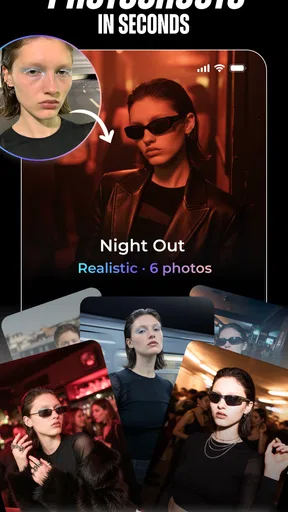
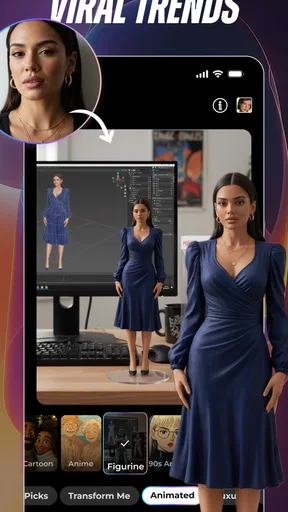


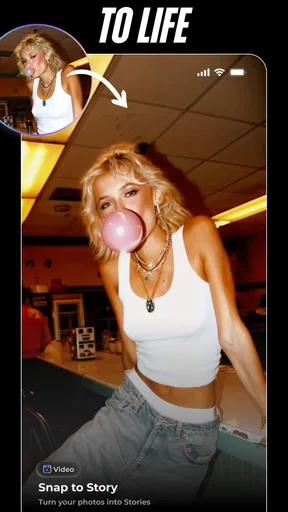
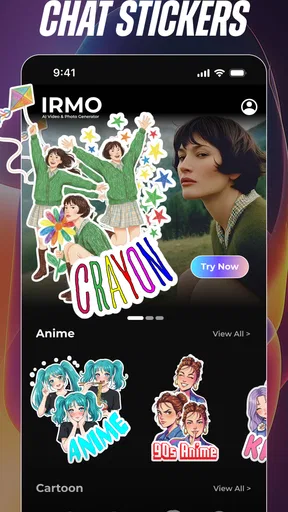

 Analysis by AppCompare
I reach for AI Photo Video Generator: IRMO when I want to turn an ordinary image or short clip into something more expressive without building an edit from scratch. Its focus is playful, AI-assisted visual creation: filters, avatars, templates and video effects are aimed at people who want a quick creative result, not a complicated editing workstation. That makes it appealing for social posts and experiments, though I would not treat it as a replacement for a precise, layer-based photo or video editor.
What the free option means in practice
The app is free to install, so you can try its creative approach before deciding whether it belongs in your routine. It also offers in-app purchases, with listed prices ranging from $2.99 to $79.99 per item. That wide span is a reason to check the price attached to a specific purchase rather than assume every effect or upgrade costs the same. I would start with the free access and only pay when a particular option solves a need I have more than once.
It is rated for Everyone, and the developer is MOBIVERSITE YAZILIM BILISIM REKLAM VE DANISMANLIK. The app has an average rating of 4.5 from around 19,000 ratings, with more than 500,000 installs. Those figures suggest that many people have tried it, but they cannot tell you whether its style suits your own photos; a few minutes testing the available tools is a better way to judge that.
Getting Started with IRMO
First things first, downloading and setting up AI Photo Video Generator: IRMO is a breeze. Available on both Android and iOS, you can grab it from your app store and dive right in. The interface is clean and intuitive, which is always a plus. No one wants to spend ages figuring out how to use an app, right?
When you open the app, you're greeted with a sleek dashboard that immediately makes you feel like you've stepped into a creative studio. You've got a range of options, from photo editing to video enhancements, all powered by AI. It's like having a personal assistant for your content creation needs.
Features That Stand Out
Now, let’s talk features. IRMO packs a punch with its array of tools designed to transform your images and videos. The AI-driven filters are particularly impressive. Whether you’re looking to enhance colors, add a dreamy glow, or transform your photo into a piece of art, IRMO's got you covered.
- AI Filters: These filters are the heart of IRMO. You can easily swipe through options and see real-time changes, which is super satisfying. The AI doesn’t just slap on a filter; it intelligently adjusts the settings to make the transformation look natural.
- Video Editing: When it comes to videos, IRMO shines with its ability to add effects that look like they came straight out of a blockbuster movie. Whether it's adding dramatic lighting or creating slow-motion sequences, the app makes it simple.
- Creative Templates: For those days when inspiration is lacking, the app offers a variety of templates to kickstart your project. Just select a template, and watch your content come to life with minimal effort.
Making a quick idea work
A useful way to approach the app is to decide on the final use before choosing an effect. If I am making a profile image, I would begin with a clear, well-lit portrait and try a small number of avatar or art treatments rather than cycling through every option. For a short social clip, I would pick the source video first, then choose an effect that supports its mood. This keeps the result intentional and makes it easier to compare versions.
Worth Reading Before You Choose

EA SPORTS FC Mobile 26 Is a Bigger Football Game, but It Takes Time

Flipboard Shows What News Apps Must Do Beyond the Feed

Switching to Android Auto Means Rethinking Your Driving Routine

Google Calendar Makes a Crowded Week Easier to Manage

Ludo King Makes the Most of the Minutes Between Plans

Baby Panda World Brings Quick Play to Modern Phones, but Its Game Library Feels Busy
For example, imagine I have a few minutes before sharing a weekend photo with friends. I can test a stylized treatment, compare it with the unedited image, and stop once the edit feels like an enhancement rather than a distraction. That quick, low-pressure workflow is where IRMO makes the most sense: it offers an easy route from a camera-roll image to a more distinctive post without requiring me to learn a full editing suite.
One small but helpful habit is to keep an untouched copy of the original image or video. AI transformations can change the feel of a face, lighting or background, and the version that looks striking in the app may not be the one I want to share later. Comparing the output beside the source helps me catch edits that are fun but too strong for the context.
Why You'll Love It
So, why should you consider making IRMO part of your digital toolkit? For starters, it’s all about enhancing creativity without needing advanced skills. The app’s AI does the heavy lifting, allowing you to focus on the fun part – creating!
Have you ever spent hours trying to get an effect just right? With IRMO, those days are over. The AI learns and adapts, offering suggestions that improve as you use the app more. It’s like having a creative buddy who knows exactly what you need.
And let’s not forget the community aspect. IRMO allows you to share your creations and get inspired by others. It's not just an app; it's a vibrant community of creators.
Where it fits among creative apps
Compared with a conventional photo editor, IRMO is more about quick transformation than careful correction. If I need to crop precisely, tune a particular color, remove a distracting detail or make a consistent set of product images, a traditional editor gives me more direct control. IRMO’s strength is the leap from a familiar photo to a stylized result, so I see it as a companion for creative variations rather than the only tool in a serious workflow.
The same distinction applies to video. A timeline-focused editor is usually the better choice when I need to arrange several shots, control exact cuts, add detailed sound work or keep a project consistent from beginning to end. IRMO is better suited to making a clip feel more eye-catching with less setup. If the goal is a quick visual idea rather than a carefully assembled production, that trade-off can be worthwhile.
It is also worth separating an AI effect from a dependable retouching tool. A dramatic filter may create a more memorable image, but it is not automatically the right choice for a professional headshot, a family archive or anything where an accurate likeness matters. I would keep the original and use the edited version selectively, especially when the transformation changes facial details or the image’s overall mood.
Who gets the most value
I would recommend trying it to casual creators who enjoy experimenting with portraits, trend-led visuals and short clips, especially if they would rather tap through a ready-made creative direction than adjust many settings. It can also be useful for someone who posts occasionally and wants a handful of options for making a familiar image feel fresh. With version 1.2.33 and a minimum OS requirement of 7.0, it is designed for compatible devices, but the experience of demanding effects can still vary with the phone.
It is less compelling for people who need predictable, repeatable edits. If you are preparing a batch of images that must match closely, or you need fine control over every adjustment, the speed of AI styling may come at the cost of precision. Likewise, anyone who only wants basic cropping and brightness correction may find a simpler editor more direct and may have little reason to pay for extra creative options.
Before buying anything, I would explore the free experience with the kinds of photos I actually use. Try a portrait, a landscape and a short clip if those are relevant to your plans. This reveals more than testing a single dramatic effect: it shows whether the app’s style works across your everyday material and whether you would return to it. Since individual in-app items have different prices, I would make a purchase only after checking the exact item and confirming it is something I will use.
Room for Improvement
Of course, no app is perfect. While IRMO offers a ton of features, it can sometimes feel a bit overwhelming, especially for newcomers. A more guided approach or tutorial section could make a huge difference for first-time users. Additionally, while the app is generally smooth, some of the more intricate features can slow things down a bit, particularly on older devices.
Another point to consider is the subscription model. While the basic features are free, unlocking the full potential of the app requires a subscription. It’s something to weigh up if you’re on a tight budget, but in my opinion, the creative possibilities it offers are well worth the investment.
For a careful value decision, I would treat the free entry point and paid items as separate questions. The free option lets me test whether the editing style fits my taste; the paid range means I should not assume that every appealing tool is included at no extra cost. I would avoid paying just because an effect looks impressive once. Repeated use is the better test: if a tool saves me effort on the kinds of posts I regularly make, its price may feel justified; if I only want a one-off novelty, free access may be enough.
There are practical limits to keep in mind, too. AI effects are most useful when the source image gives them something clear to work with, so I would choose a sharp photo with a visible subject rather than expect an unclear or poorly lit shot to become reliably polished. I would also preview the finished result before sharing it; visual transformations can create a look that suits a playful post but feels out of place in a work or formal setting.
Final Thoughts
Overall, AI Photo Video Generator: IRMO is a fantastic app for anyone looking to add a bit of flair to their photos and videos. Whether you’re a seasoned creator or just getting started, the app’s blend of ease-of-use and powerful AI-driven features will have you producing stunning content in no time.
So, if you're ready to unleash your creativity, give IRMO a whirl. It might just become your new favorite creative companion. Happy creating!
My verdict is to try it if your main goal is playful, quick visual experimentation and you are happy to judge paid options one by one. I would skip it as a primary editor if accuracy, repeatable results or detailed timeline control matters more than fast styling. The free starting point makes exploration easy, while the broad range of in-app prices makes a little restraint sensible. For the right person, that balance is appealing; for everyone else, a conventional editor may be the more useful everyday choice.
Pros
- User-friendly interface for quick edits.
- Wide range of templates and styles.
- Fast processing of images and videos.
- No prior editing skills needed.
- Regular updates with new features.
Cons
- Requires internet connection to function.
- Limited free features available.
- Subscription can be pricey for some.
- Occasional app crashes reported.
- High-quality output may take time.
FAQs for AI Photo Video Generator: IRMO
What platforms is AI Photo Video Generator: IRMO available on?
AI Photo Video Generator: IRMO is available for both Android and iOS platforms. Users can download it from the Google Play Store for Android devices and the Apple App Store for iOS devices. Ensure your device meets the app's minimum system requirements for optimal performance.
Does AI Photo Video Generator: IRMO offer free features?
Yes, AI Photo Video Generator: IRMO offers a variety of free features that allow users to explore basic functionalities. However, for more advanced features and capabilities, users may need to make in-app purchases or subscribe to a premium version. This allows for a broader range of creative options.
How user-friendly is AI Photo Video Generator: IRMO for beginners?
AI Photo Video Generator: IRMO is designed with a user-friendly interface, making it accessible for beginners. The app provides tutorials and guides to help new users navigate through its features. Its intuitive design ensures that even those with limited experience in photo and video editing can create impressive content.
What are the primary features of AI Photo Video Generator: IRMO?
AI Photo Video Generator: IRMO offers a range of features including AI-driven photo enhancements, video editing tools, and creative filters. Users can easily transform photos into videos, apply special effects, and utilize advanced editing options to create professional-quality content with minimal effort.
Is AI Photo Video Generator: IRMO safe to use regarding privacy?
AI Photo Video Generator: IRMO prioritizes user privacy and security. The app adheres to strict privacy policies, ensuring that user data is protected and not shared without consent. Users are encouraged to review the privacy policy and terms of use before downloading to understand data handling practices.


